YBS ISP INVENTORY
MANAGEMENT SYSTEM
The Hidden Money Leak in Every ISP
"May stock tayo kahapon. Bakit ubos na ngayon?"
Many ISP owners experience inventory losses every month without knowing where the items went.
Common examples:
Missing ONUs
Missing routers
Missing fiber cables
Missing connectors
Missing tools
Missing office supplies
Nobody knows:
Who received it
Who used it
Where it was installed
Whether it was returned
Whether it was lost
At the end of the month, inventory simply disappears.
Technician Accountability Problem
"Boss, naubos po yung fiber."
But:
How many meters were assigned?
How many meters were actually used?
How many meters were returned?
Was it damaged?
Was it lost?
Without tracking, the business simply accepts whatever explanation is given.
Over time:
Inventory losses increase
Material usage becomes questionable
Technicians cannot be held accountable
Emergency Purchase Nightmare
New installation today...
Then suddenly:
❌ No ONU available
❌ No connector available
❌ No fiber cable available
Now the technician cannot proceed.
Result:
Delayed installation
Angry customer
Lost revenue
Bad reputation
All because nobody knew inventory was already low.
The Spreadsheet Problem
Many ISPs still use:
Excel
Notebooks
Messenger messages
Verbal inventory requests
Example:
"Boss, may stock pa bang ONU?"
Then everyone starts asking around.
Nobody has a real answer.
Inventory decisions become guesswork.
Uncontrolled Warehouse
Many ISP owners believe they have:
500 ONUs
10 rolls of fiber cable
50 routers
Until they perform a physical count.
Then they discover:
Missing inventory
Wrong quantities
Unrecorded usage
Lost equipment
The actual inventory is very different from the system inventory.
No Visibility of Inventory Value
Most ISP owners know:
✔ How many subscribers they have
✔ How much collections they received
But they don't know:
❌ How much inventory they own
❌ How much inventory was damaged
❌ How much inventory was lost
❌ How much inventory is sitting unused
Thousands or even hundreds of thousands of pesos are tied up in inventory without visibility.
Lost Company Assets
Examples:
Ladder
Fusion Splicer
OTDR
Power Meter
Crimping Tool
Question:
Who has it right now?
Nobody knows.
Then after several months:
"Boss, hindi ko na po alam kung nasaan."
The company buys another one.
The cycle repeats.
Inventory Theft Is Hard to Detect
Without assignment tracking:
ONUs disappear
Routers disappear
Tools disappear
Materials disappear
Since there is no assignment history:
Nobody can identify:
Who received it
When it was issued
What happened afterward
Business Growth Creates More Inventory Chaos
When an ISP grows from:
100 subscribers → 500 subscribers → 1,000 subscribers
Inventory complexity grows dramatically.
More:
Technicians
Warehouses
Equipment
Installations
Repairs
What worked with Excel at 100 subscribers often fails completely at 1,000 subscribers.
The Real Cost
Many ISP owners think:
"Inventory loss is normal."
But imagine:
5 missing ONUs = ₱7,500
2 missing routers = ₱4,000
100 meters missing fiber = ₱5,000
Lost tools = ₱10,000
That's already:
₱26,500+
lost from inventory.
And that can happen every few months.
Stop Losing Inventory Without Knowing Why
Your ISP may be losing thousands of pesos every month due to untracked inventory, missing equipment, undocumented technician usage, and unexpected stock shortages.
With the ISP Inventory Management System, you can:
✅ Track every ONU, router, cable, and tool
✅ Know exactly who received inventory
✅ Monitor technician accountability
✅ Prevent stock shortages before they happen
✅ Track lost and damaged items
✅ Manage supplier purchases
✅ Receive low stock alerts
✅ Monitor inventory value and losses
✅ Generate complete inventory reports
✅ Audit inventory with confidence
Whether you have 100 subscribers or 10,000 subscribers, proper inventory control protects your profits, improves technician accountability, and helps your ISP grow without inventory chaos.
Because what you don't track, you eventually lose.
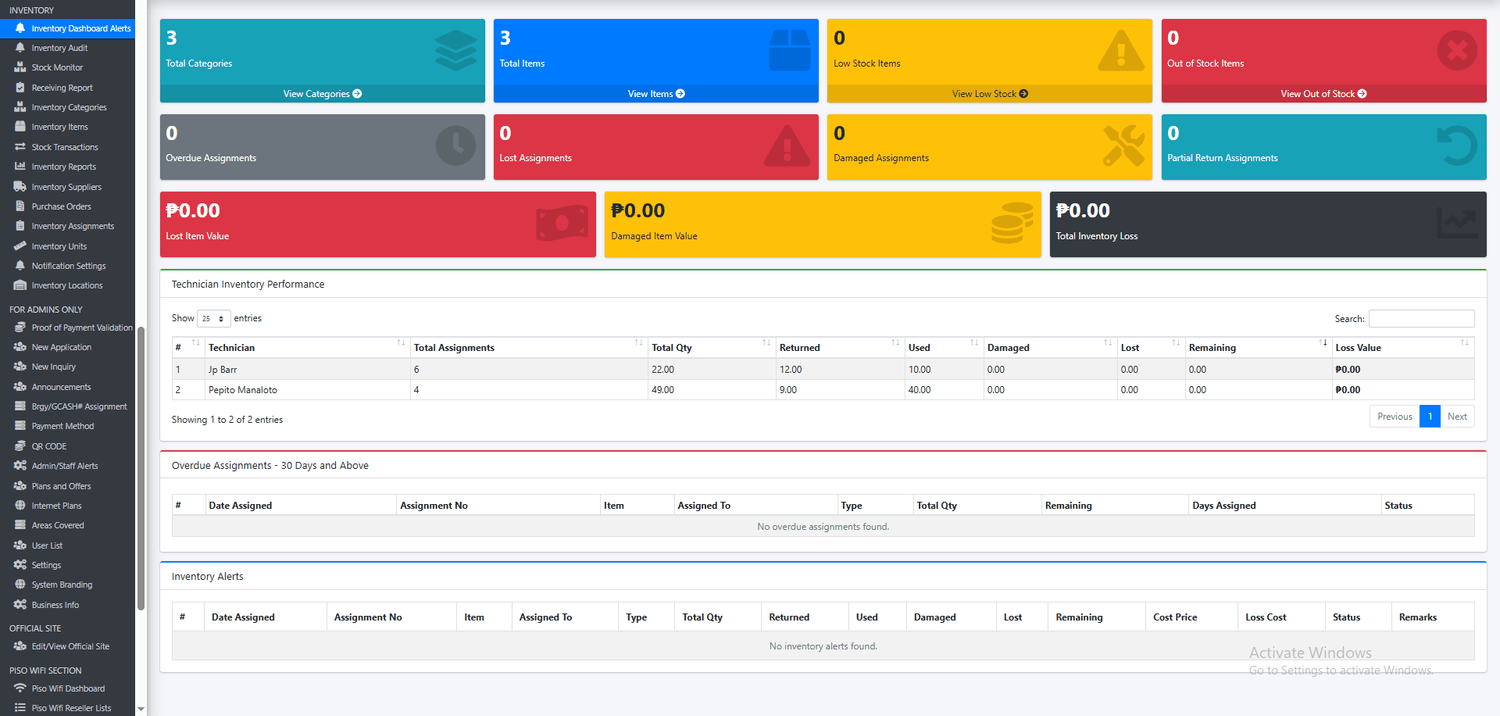
Inventory Dashboard Alerts
The Inventory Dashboard Alerts page gives administrators a complete real-time overview of the ISP inventory status in one screen. It summarizes the most important inventory information such as total categories, total items, low stock items, out-of-stock items, overdue assignments, lost assignments, damaged assignments, and partial return assignments.
This dashboard helps ISP owners and staff quickly monitor inventory health, technician accountability, and possible inventory losses. It also shows the total value of lost and damaged items, making it easier to track financial impact and prevent unnoticed losses.
The page includes a Technician Inventory Performance table where each technician’s assigned items, returned items, used items, damaged items, lost items, remaining balances, and loss value are displayed clearly. This allows the admin to check who still has pending items, who returned materials, and how inventory is being used in actual field operations.
It also includes a dedicated Overdue Assignments section for items that have been assigned for 30 days or more, helping the business follow up on tools, equipment, or assets that should have already been returned. Consumable items can be excluded from overdue tracking, making the alerts more accurate.
The Inventory Alerts section provides a detailed list of assignments that need attention, including damaged, lost, partially returned, or remaining items. This helps prevent manual tracking errors and gives the business better control over company assets, technician-issued items, and field materials.
This feature is especially useful for ISP businesses that assign modems, routers, cables, tools, and installation materials to technicians. Instead of relying on manual notes or verbal updates, the system provides a centralized monitoring page for faster decision-making, better accountability, and reduced inventory losses.
Inventory Audit Count
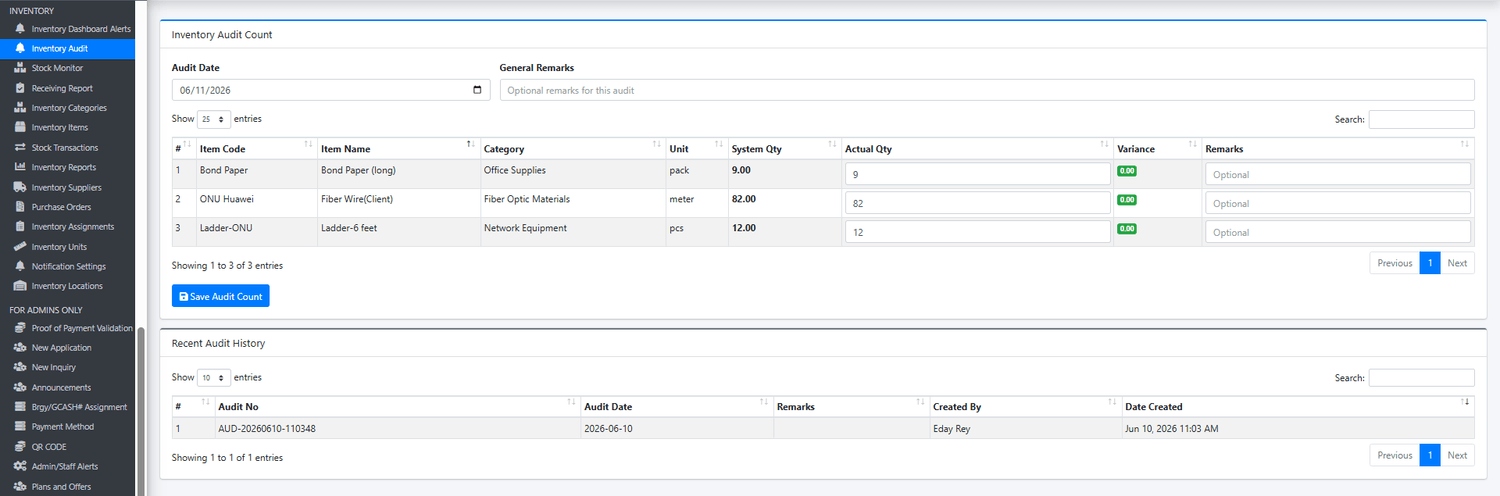
The Inventory Audit Count page is designed to help ISP businesses perform regular physical inventory verification and ensure that the actual stock on hand matches the quantities recorded in the system. This feature provides a simple and organized way to conduct inventory audits, identify discrepancies, and maintain accurate inventory records.
During an audit, the administrator or inventory staff can select the audit date and enter the actual physical quantity counted for each inventory item. The system automatically displays the current system quantity and calculates any variance between the recorded stock and the actual count. Positive or negative variances can immediately highlight potential issues such as missing inventory, data entry mistakes, unrecorded stock movements, damaged items, theft, or inventory adjustments that were not properly documented.
Each item can also have individual remarks added, allowing staff to record explanations for quantity differences, damaged stock, counting errors, or other audit findings. A general audit remark section is also available to document overall observations and recommendations for the entire audit session.
The page maintains a complete Audit History that records every inventory count conducted within the system. Each audit is assigned a unique audit number and stores the audit date, remarks, user who performed the audit, and creation date. This provides a permanent audit trail that can be reviewed at any time for inventory investigations, management reporting, and accountability purposes.
Key Benefits
Verify actual physical stock against system records.
Automatically detect inventory shortages and overages.
Improve inventory accuracy and accountability.
Identify lost, damaged, misplaced, or undocumented inventory.
Maintain a complete historical record of inventory audits.
Support internal control procedures and inventory reconciliation.
Reduce inventory discrepancies and improve stock management decisions.
Provide management with reliable inventory accuracy reports.
Ideal for ISP Operations
This feature is especially useful for Internet Service Providers managing large quantities of network equipment, installation materials, spare parts, office supplies, and technician tools. Regular inventory audits help ensure that fiber optic cables, routers, ONUs, connectors, networking equipment, tools, and consumable materials are properly accounted for and accurately reflected within the inventory system.
By performing routine inventory audits, businesses can minimize inventory losses, improve stock reliability, strengthen technician accountability, and maintain better control over company assets and operational materials.
Inventory Stock Monitor
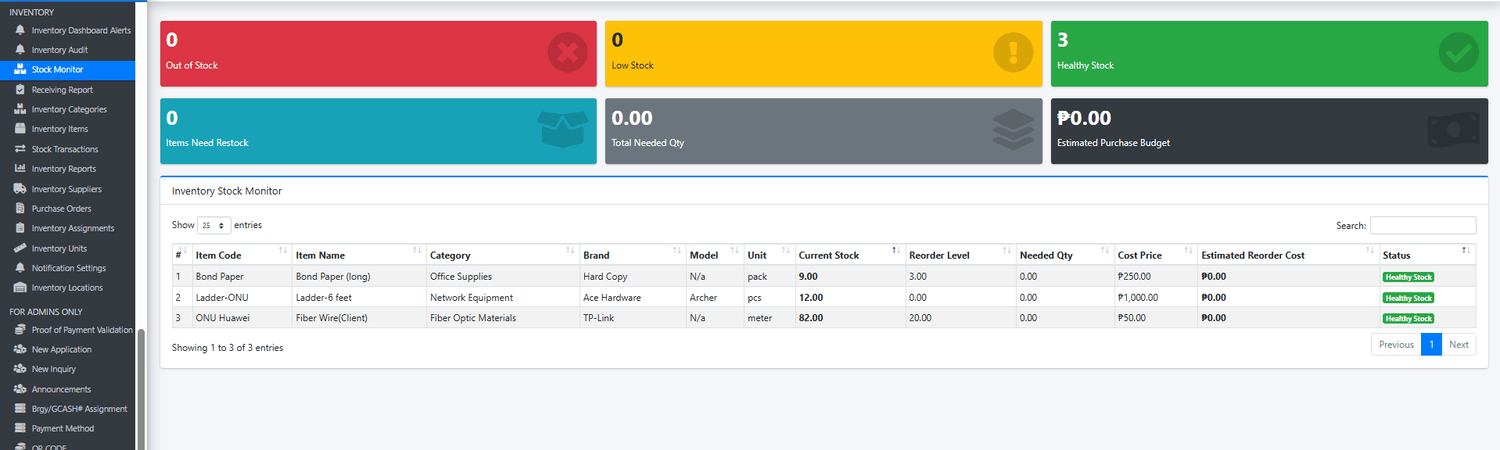
The Inventory Stock Monitor page serves as the central monitoring tool for inventory levels across the organization. It provides administrators and inventory managers with a real-time view of stock availability, helping ensure that critical materials, equipment, and supplies are always available when needed.
This feature continuously tracks inventory quantities and automatically categorizes items into Healthy Stock, Low Stock, and Out of Stock conditions based on their configured reorder levels. By providing immediate visibility into stock status, the system helps businesses avoid shortages, service delays, and emergency purchasing situations.
The dashboard summarizes important inventory metrics including the total number of out-of-stock items, low-stock items, healthy-stock items, items requiring restocking, total quantity needed for replenishment, and the estimated budget required for purchasing replacement stock.
Each inventory item is displayed with detailed stock information including item code, item name, category, brand, model, unit of measure, current stock quantity, reorder level, needed quantity, cost price, estimated reorder cost, and stock status. This allows administrators to quickly determine which items require attention and how much inventory should be purchased to maintain optimal stock levels.
The system automatically calculates the quantity needed to reach the desired stock level and estimates the purchasing budget based on the item's cost price. This helps management make informed procurement decisions and improve inventory planning.
Key Benefits
Real-time inventory stock monitoring.
Automatic low-stock and out-of-stock detection.
Configurable reorder levels per inventory item.
Early warning system for inventory shortages.
Estimated replenishment quantities and purchasing budgets.
Improved procurement planning and forecasting.
Reduced service interruptions caused by unavailable inventory.
Better visibility of inventory health across all categories.
Faster decision-making for inventory replenishment.
Ideal for ISP Operations
For Internet Service Providers, maintaining adequate inventory is critical to support new installations, maintenance activities, repairs, and network expansion projects. The Inventory Stock Monitor helps track essential materials such as:
Fiber optic cables
ONUs and modems
Routers and networking equipment
Connectors and adapters
Installation tools and technician equipment
Office and operational supplies
Spare parts and replacement devices
By continuously monitoring inventory levels and identifying replenishment needs before shortages occur, ISP businesses can improve operational efficiency, reduce downtime, minimize emergency purchases, and ensure technicians always have the materials necessary to serve customers effectively.
Business Impact
Instead of manually checking inventory records or waiting until stock runs out, management receives an instant overview of inventory health and future purchasing requirements. This proactive approach helps reduce operational risks, improve budgeting accuracy, strengthen inventory control, and support long-term business growth through better inventory management practices.
Inventory Receiving Report
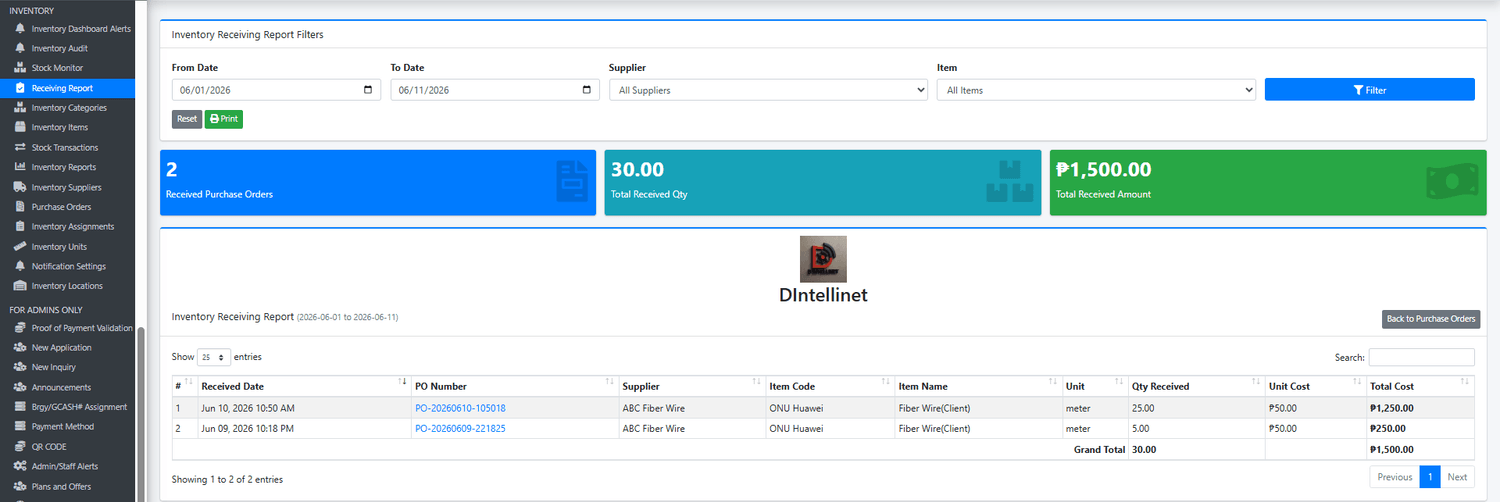
The Inventory Receiving Report provides a complete record of all inventory items received from suppliers through approved purchase orders. This feature helps businesses monitor incoming inventory, track supplier deliveries, verify received quantities, and maintain accurate purchasing records.
The report allows administrators to generate detailed receiving reports using flexible filters such as date range, supplier, and inventory item. This makes it easy to review specific deliveries, supplier transactions, or inventory receipts for a selected period.
A summary dashboard is displayed at the top of the page, providing an instant overview of purchasing activity, including the total number of received purchase orders, total quantity of items received, and the total monetary value of all received inventory. These metrics help management quickly understand purchasing trends and inventory replenishment activities.
The detailed report section displays every received purchase order transaction, including the receiving date, purchase order number, supplier, item code, item name, unit of measure, quantity received, unit cost, and total cost. This provides a complete audit trail of inventory entering the organization and allows easy verification against supplier invoices and purchase records.
The built-in print feature enables users to generate professional receiving reports for management review, accounting purposes, supplier reconciliation, inventory audits, and record-keeping requirements.
Key Benefits
Complete tracking of all received inventory.
Monitor supplier deliveries and purchase order fulfillment.
Verify quantities received against purchase orders.
Track inventory acquisition costs.
Generate receiving reports by date, supplier, or item.
Maintain a permanent audit trail of inventory receipts.
Simplify supplier reconciliation and invoice verification.
Improve purchasing transparency and accountability.
Support inventory valuation and financial reporting.
Ideal for ISP Operations
For Internet Service Providers, inventory replenishment is critical to support installations, maintenance, repairs, and network expansion. The Inventory Receiving Report helps track incoming inventory such as:
Fiber optic cables
ONUs and modems
Routers and networking devices
Connectors and adapters
Installation materials
Technician tools and equipment
Office and operational supplies
Spare parts and replacement inventory
Every delivery received from suppliers is documented and recorded, ensuring that purchased inventory is properly added into stock and available for future assignments and operations.
Business Impact
Without a receiving report system, businesses often rely on manual logs, spreadsheets, or paper records to track incoming inventory. This can lead to missing stock, incorrect inventory balances, duplicate purchases, and supplier disputes.
The Inventory Receiving Report provides a centralized and automated solution for managing inventory receipts. It strengthens inventory control, improves purchasing accuracy, enhances supplier accountability, and gives management clear visibility into inventory investments and stock replenishment activities.
For growing ISP businesses, this feature serves as a critical bridge between purchasing and inventory management, ensuring that every purchased item is properly received, recorded, and accounted for within the system.

Inventory Categories
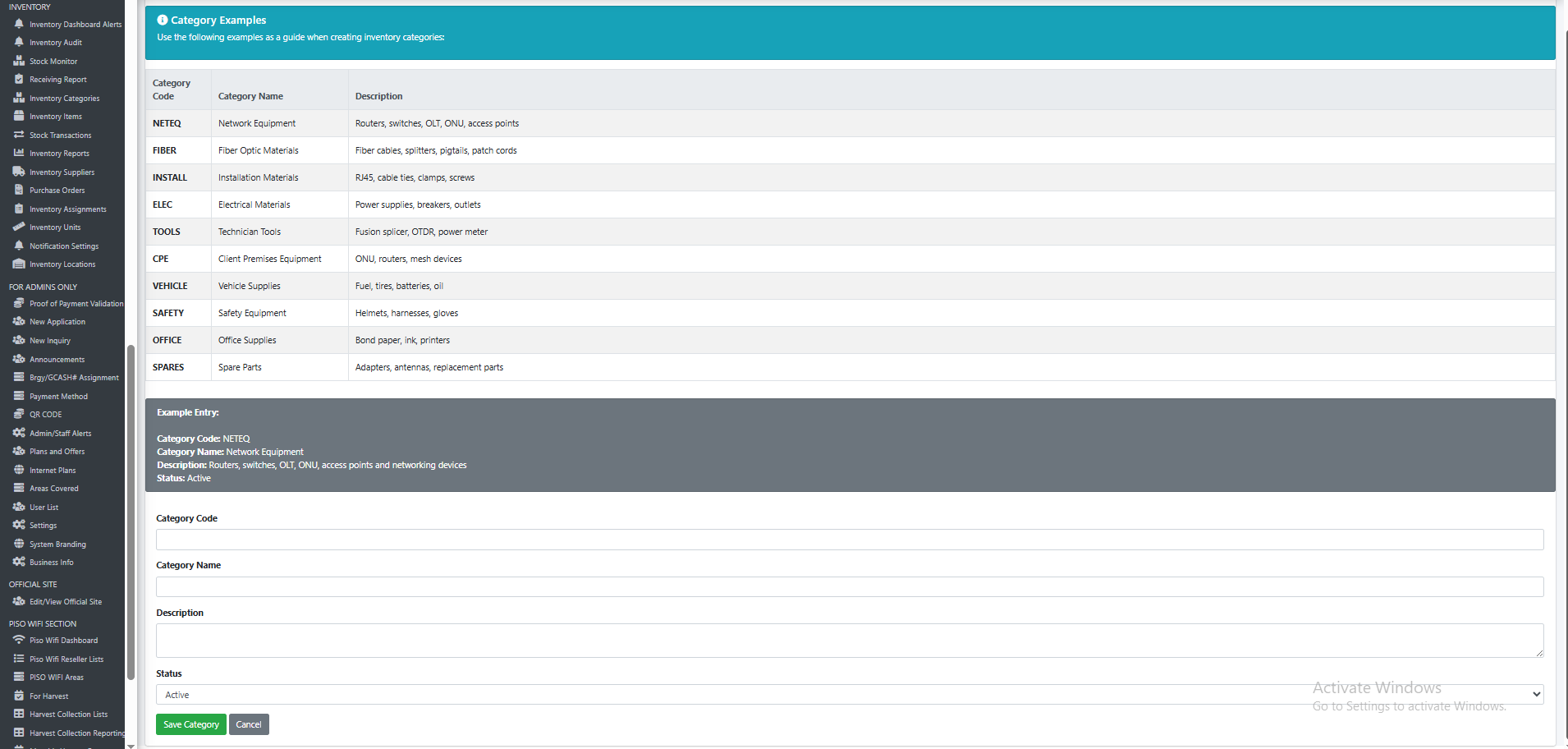
The Inventory Categories page serves as the foundation of the entire inventory management system by organizing inventory items into structured groups. This feature allows businesses to create, manage, and maintain inventory classifications that make inventory tracking, reporting, purchasing, stock monitoring, and assignment management more organized and efficient.
Each category represents a specific group of inventory items based on their purpose, usage, or business function. By categorizing inventory properly, administrators can quickly locate items, generate category-based reports, analyze inventory consumption, and improve stock management across the organization.
The system allows administrators to define a unique category code, category name, detailed description, and status for each inventory category. Categories can be activated or deactivated depending on business requirements while preserving historical inventory records.
To simplify setup, the page includes built-in category examples commonly used by Internet Service Providers and technology businesses. These examples help users establish a standardized inventory structure that supports both operational and financial inventory management.
Category Examples
The system supports various inventory classifications, including:
Network Equipment – Routers, switches, OLTs, ONUs, access points, and networking devices.
Fiber Optic Materials – Fiber cables, splitters, pigtails, patch cords, and optical components.
Installation Materials – RJ45 connectors, cable ties, clamps, screws, and installation supplies.
Electrical Materials – Power supplies, breakers, outlets, adapters, and electrical components.
Technician Tools – Fusion splicers, OTDR devices, power meters, drills, and hand tools.
Client Premises Equipment (CPE) – ONUs, routers, mesh devices, and customer-installed equipment.
Vehicle Supplies – Fuel, tires, batteries, lubricants, and vehicle maintenance items.
Safety Equipment – Helmets, gloves, harnesses, and technician safety gear.
Office Supplies – Bond paper, printers, ink cartridges, and office consumables.
Spare Parts – Replacement components, antennas, adapters, and repair materials.
Key Benefits
Organizes inventory into structured and manageable groups.
Improves inventory search and reporting efficiency.
Simplifies stock monitoring and purchasing analysis.
Supports category-based inventory audits and valuation.
Enhances inventory visibility across departments.
Reduces inventory management errors.
Creates a standardized inventory classification system.
Provides a scalable structure for future inventory growth.
Ideal for ISP Operations
Internet Service Providers often manage hundreds or even thousands of inventory items ranging from fiber optic materials and networking equipment to technician tools and office supplies. Without proper categorization, inventory records can become difficult to manage and analyze.
The Inventory Categories feature provides a structured framework that helps businesses maintain organized inventory records while supporting purchasing, receiving, stock monitoring, technician assignments, asset tracking, and inventory reporting.
Business Impact
A well-organized inventory classification system is the backbone of effective inventory management. By establishing standardized categories, businesses can improve inventory accuracy, accelerate operational processes, simplify reporting, strengthen inventory controls, and gain better visibility into inventory usage and investments.
This feature ensures that every inventory item is properly classified, making the entire inventory management process more efficient, scalable, and easier to manage as the business grows.


Inventory Items
The Inventory Items page serves as the master inventory registry where all inventory assets, materials, equipment, supplies, and consumable products are defined and maintained. This feature acts as the central database for inventory management, ensuring that every item tracked within the organization has complete information, accurate stock levels, and proper classification.
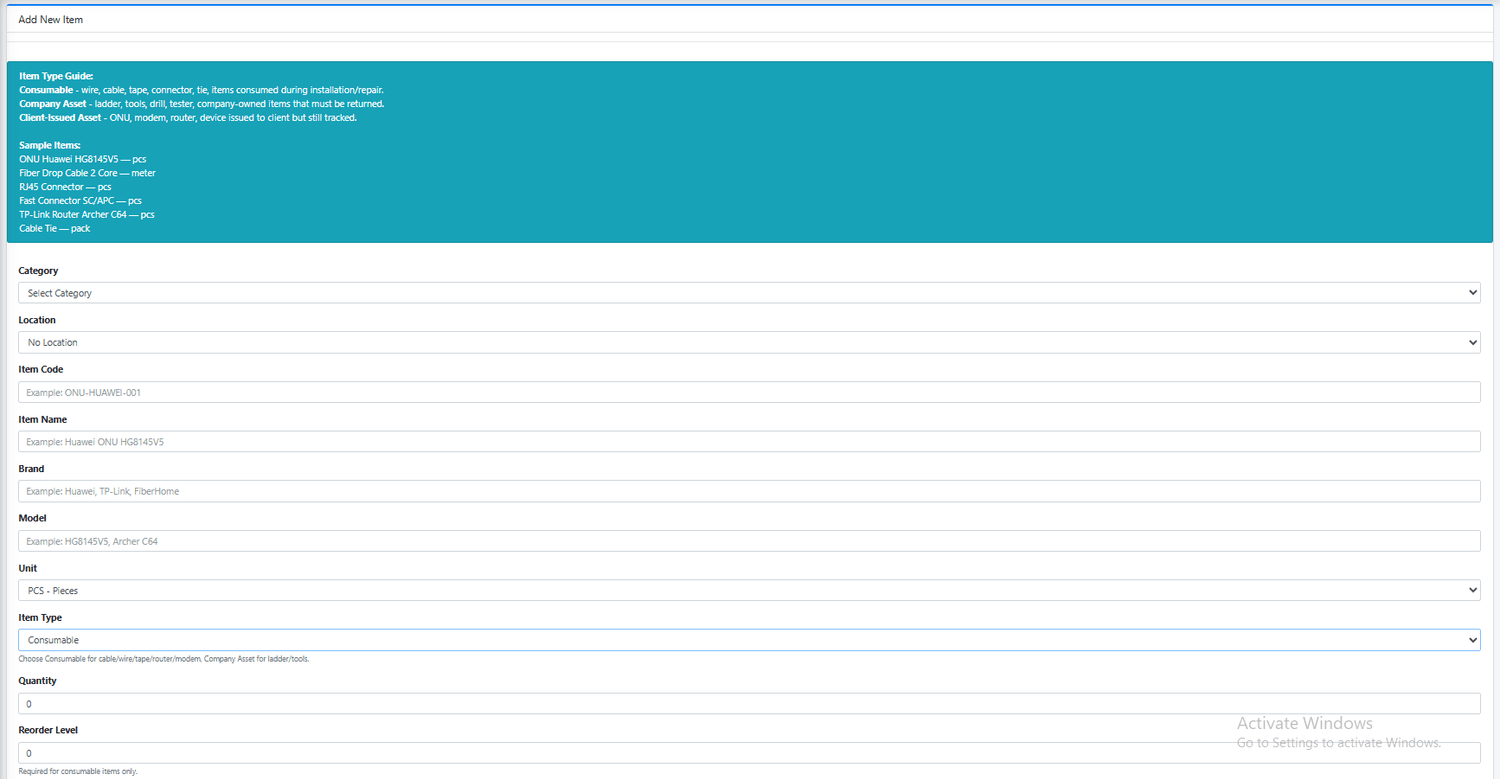
Each inventory item contains detailed information including category, location, item code, item name, brand, model, unit of measurement, item type, quantity, reorder level, cost price, selling price, and status. This information allows businesses to accurately monitor inventory movement, stock valuation, purchasing requirements, technician assignments, and asset accountability.
The system supports different inventory item types to accommodate the various materials and equipment commonly used by Internet Service Providers and technology businesses.
Inventory Item Types
Consumable Items
Consumable items are materials that are used, consumed, or depleted during installation, maintenance, repair, or daily operations. Once used, these items are generally not expected to be returned to inventory.
Examples include:
Fiber optic cables
RJ45 connectors
Fast connectors
Electrical tape
Cable ties
Patch cords
Installation materials
Office supplies
Consumable items support reorder levels and stock monitoring to ensure that critical materials remain available for field operations.
Company Assets
Company Assets are reusable items owned by the business that are assigned to technicians, staff, or departments but are expected to be returned and accounted for.
Examples include:
Ladders
Fusion splicers
OTDR equipment
Power meters
Drills
Hand tools
Test equipment
Safety equipment
These assets can be tracked through inventory assignments and monitored for accountability, loss, damage, and return status.
Client-Issued Assets
Client-Issued Assets are devices provided to customers while still being tracked by the company for inventory and asset management purposes.
Examples include:
ONUs
Routers
Modems
Mesh devices
Customer premise equipment (CPE)
These items allow businesses to maintain visibility of equipment deployed to customer locations.
Key Features
Centralized inventory item database.
Unique item codes for inventory identification.
Category-based inventory organization.
Brand and model tracking.
Unit of measure management.
Multiple inventory item classifications.
Stock quantity monitoring.
Reorder level configuration.
Cost and selling price management.
Active and inactive item control.
Location tracking support.
Inventory valuation support.
Stock and Cost Management
The Inventory Items page serves as the foundation for all inventory transactions throughout the system. Every purchase order, stock receipt, assignment, return, loss, damage report, stock adjustment, audit count, and inventory report references the inventory records created here.
The system stores both cost prices and selling prices, allowing businesses to track inventory investments, estimate stock value, calculate replacement costs, and support purchasing decisions.
For consumable items, reorder levels can be configured to trigger low-stock and out-of-stock monitoring alerts, helping administrators replenish inventory before shortages occur.
Ideal for ISP Operations
Internet Service Providers manage a wide range of inventory items across multiple operational areas. This feature provides structured management for:
Fiber optic materials
Network equipment
Installation supplies
Spare parts
Technician tools
Customer devices
Safety equipment
Office supplies
Vehicle-related inventory
By maintaining a complete inventory item database, businesses can improve inventory accuracy, simplify stock monitoring, streamline purchasing, strengthen technician accountability, and maintain full visibility over all operational inventory assets.
Business Impact
The Inventory Items module serves as the backbone of the entire inventory management system. Without properly maintained inventory records, stock monitoring, purchasing, assignments, receiving, auditing, and reporting become difficult to manage accurately.
By providing a centralized inventory registry with detailed item information and classification controls, businesses gain better inventory visibility, stronger operational control, improved stock accuracy, and more informed purchasing and inventory management decisions.
Stock Transactions
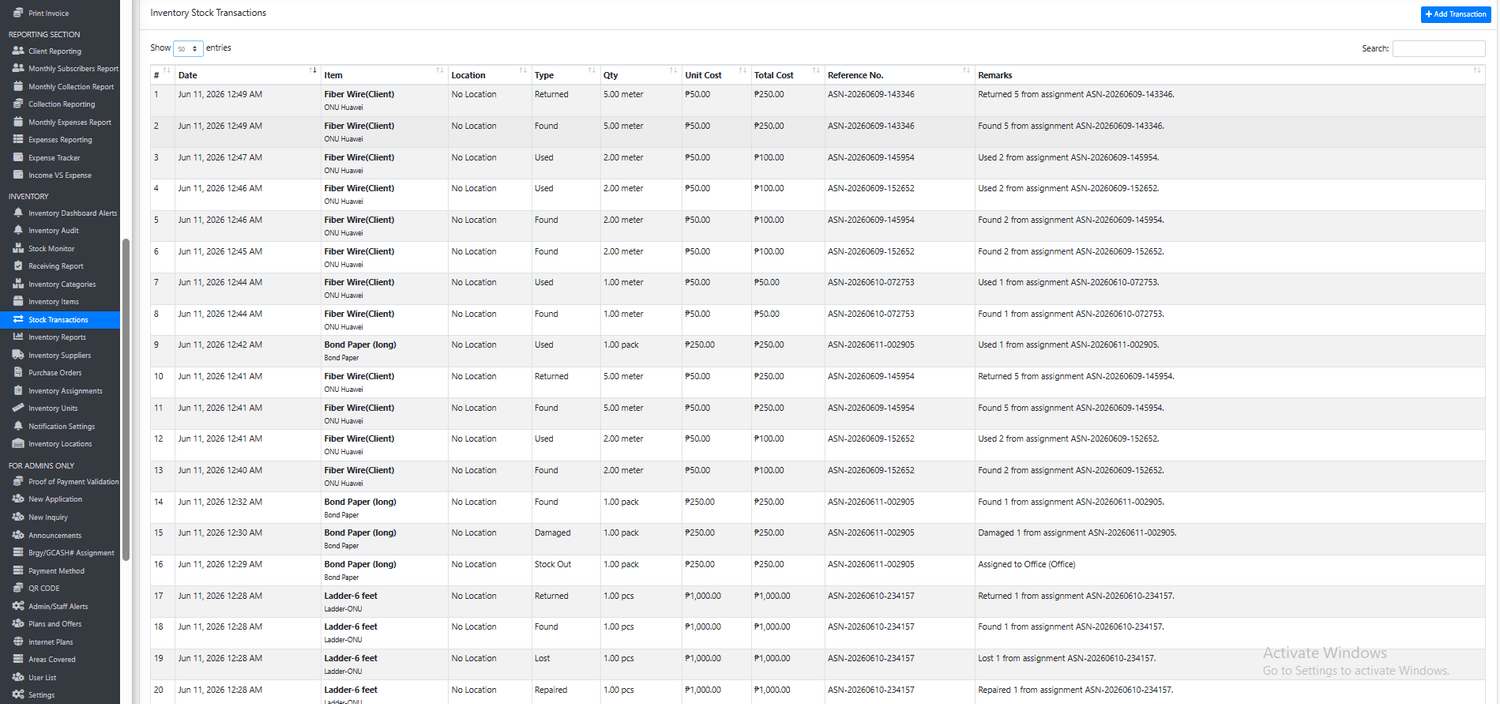
The Inventory Stock Transactions page serves as the complete transaction ledger of the inventory management system. Every inventory movement recorded within the system is automatically documented and stored in this module, providing businesses with a detailed audit trail of all stock activities.
This feature tracks the entire lifecycle of inventory items, from stock acquisition and receiving, to assignments, usage, returns, adjustments, transfers, damages, repairs, losses, and disposals. Every transaction is recorded with complete details, ensuring full inventory visibility and accountability.
The transaction history displays critical information such as transaction date and time, inventory item, location, transaction type, quantity, unit cost, total cost, reference number, and transaction remarks. This provides administrators with a clear record of who moved inventory, when it was moved, and why the movement occurred.
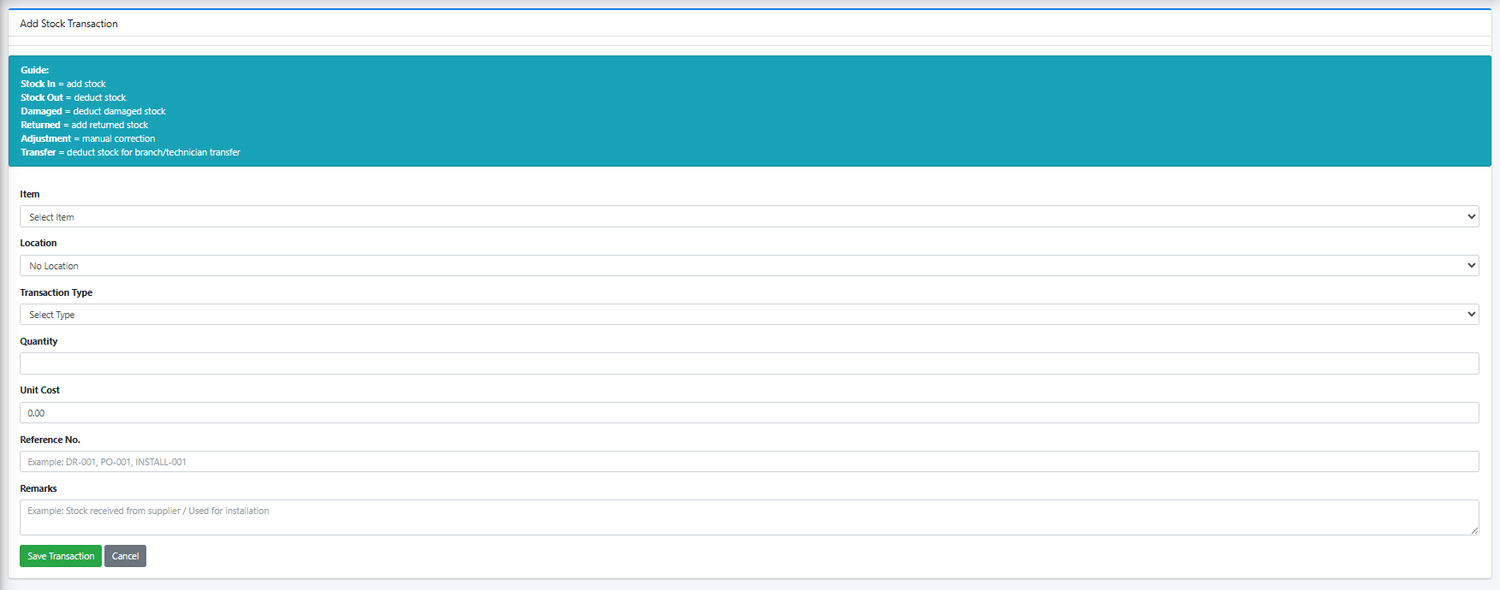
In addition to automatic inventory movements generated by purchase orders, assignments, returns, and processing actions, administrators can also manually create stock transactions for inventory corrections, transfers, and operational adjustments.
Supported Transaction Types
The system supports multiple transaction types to accurately reflect real-world inventory activities.
Stock In
Used when new inventory is added into stock.
Examples:
Supplier deliveries
Purchase order receipts
Initial inventory setup
Inventory replenishment
Effect:
Increases available inventory quantity.
Stock Out
Used when inventory is issued, consumed, assigned, or removed from available stock.
Examples:
Office consumption
Installation materials issued
Inventory assigned to staff
Inventory allocated to projects
Effect:
Reduces available inventory quantity.
Returned
Used when previously assigned inventory is returned to company stock.
Examples:
Technician returns unused materials
Returned equipment
Recovered inventory
Effect:
Adds inventory back into available stock.
Damaged
Used when inventory becomes damaged and can no longer be used normally.
Examples:
Broken ONU
Damaged router
Defective equipment
Destroyed materials
Effect:
Reduces available inventory and records inventory loss.
Lost
Used when inventory cannot be recovered or located.
Examples:
Missing tools
Lost equipment
Unrecoverable inventory
Effect:
Records inventory loss and accountability.
Repaired
Used when damaged company assets are repaired and returned to operational status.
Examples:
Repaired fusion splicer
Fixed power meter
Restored technician equipment
Effect:
Updates asset condition and repair history.
Found
Used when previously lost inventory is recovered.
Examples:
Located missing tools
Recovered equipment
Returned misplaced assets
Effect:
Restores inventory accountability records.
Adjustment
Used for manual inventory corrections.
Examples:
Audit count corrections
Inventory reconciliation
Data correction after stock verification
Effect:
Increases or decreases stock depending on adjustment requirements.
Transfer
Used when inventory is moved between locations, branches, warehouses, or personnel.
Examples:
Main warehouse to branch office
Warehouse to technician
Branch-to-branch transfers
Effect:
Maintains inventory tracking across locations.
Key Benefits
Complete inventory movement history.
Full audit trail of every stock activity.
Automatic transaction recording from inventory operations.
Manual transaction entry for corrections and adjustments.
Detailed transaction costing and valuation.
Inventory accountability and traceability.
Simplified inventory investigations and audits.
Improved inventory transparency and control.
Enhanced reporting and operational visibility.
Ideal for ISP Operations
Internet Service Providers frequently manage inventory movements involving:
Fiber optic cables
ONUs and modems
Routers and networking equipment
Installation materials
Technician tools
Spare parts
Office supplies
Safety equipment
The Inventory Stock Transactions module records every movement of these items, allowing management to monitor inventory consumption, technician usage, equipment returns, losses, damages, repairs, and stock replenishment activities.
Business Impact
Without a transaction tracking system, businesses often struggle to determine why stock quantities changed, who used inventory, or when losses occurred. This can result in inaccurate inventory records, unaccounted inventory losses, and weak operational controls.
The Inventory Stock Transactions feature provides a complete historical record of all inventory activities, creating transparency, strengthening accountability, supporting inventory audits, and ensuring accurate inventory management across the entire organization.
For growing ISP businesses, this page serves as the official inventory audit trail, providing the detailed transaction history necessary for inventory control, financial reporting, operational analysis, and long-term asset management.
Inventory Reports
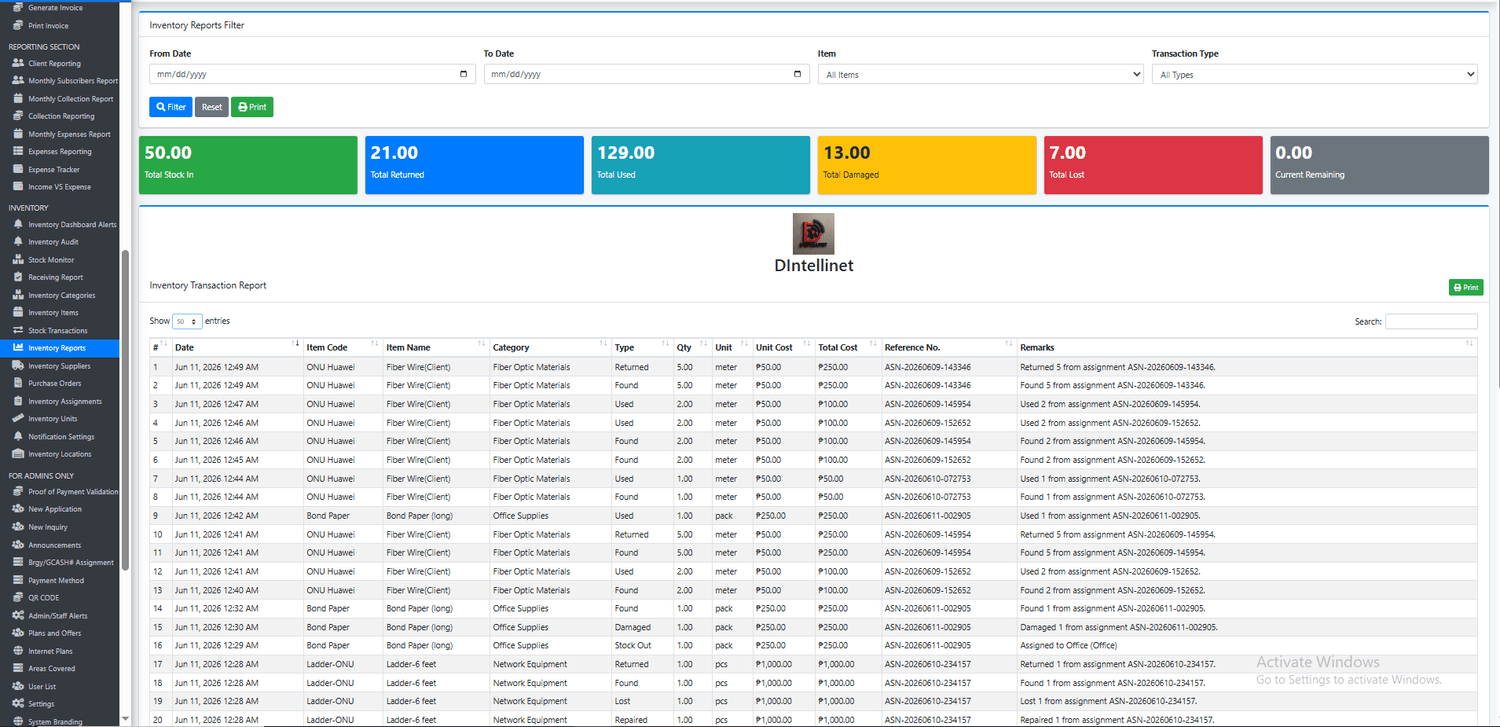
The Inventory Reports page provides a comprehensive view of all inventory activities and movements within the organization. It serves as a centralized reporting tool that helps management analyze inventory usage, monitor stock movement trends, evaluate inventory losses, and generate detailed inventory transaction reports for operational and financial decision-making.
This feature consolidates inventory transactions from across the entire inventory system and presents them in a structured, searchable, and printable format. Administrators can quickly generate reports based on specific date ranges, inventory items, and transaction types, allowing them to focus on the exact information needed for audits, investigations, inventory reviews, and management reporting.
The dashboard automatically summarizes key inventory metrics, including total stock received, total returned items, total inventory used, damaged inventory, lost inventory, and current remaining stock. These summary figures provide an instant overview of inventory performance and inventory movement during the selected reporting period.
The detailed report section displays every recorded inventory transaction along with complete transaction information including transaction date, item code, item name, category, transaction type, quantity, unit of measure, unit cost, total cost, reference number, and remarks. This creates a complete inventory activity history that can be reviewed, exported, or printed whenever needed.
Report Filters
The Inventory Reports page includes flexible filtering options to help users generate targeted inventory reports.
Date Range Filter
Generate reports for specific periods such as:
Daily inventory activity
Weekly inventory summaries
Monthly inventory reports
Quarterly inventory reviews
Annual inventory analysis
Item Filter
Generate reports for individual inventory items such as:
Fiber optic cables
ONUs
Routers
Modems
Installation materials
Technician tools
Office supplies
Transaction Type Filter
Analyze specific inventory activities including:
Stock In
Stock Out
Returned
Used
Damaged
Lost
Found
Repaired
Adjustment
Transfer
Summary Dashboard
The reporting dashboard provides real-time inventory performance indicators including:
Total Stock In
Displays all inventory quantities added into stock through purchases, receiving activities, adjustments, and replenishments.
Total Returned
Displays inventory quantities successfully returned to company inventory.
Total Used
Shows inventory consumed during installations, repairs, maintenance, and operational activities.
Total Damaged
Tracks inventory that has been damaged, defective, or rendered unusable.
Total Lost
Tracks inventory that has been lost, misplaced, or cannot be recovered.
Current Remaining
Displays the remaining inventory quantity available after all inventory movements have been processed.
Key Benefits
Centralized inventory reporting platform.
Complete inventory transaction history.
Flexible report filtering options.
Inventory usage analysis.
Inventory loss tracking.
Damage and recovery monitoring.
Cost and valuation reporting.
Printable inventory reports.
Improved inventory transparency.
Enhanced management decision-making.
Ideal for ISP Operations
Internet Service Providers handle large volumes of inventory across installations, repairs, maintenance work, and network expansion projects. The Inventory Reports module provides visibility into inventory consumption and operational performance involving:
Fiber optic materials
Networking equipment
Customer premise equipment (CPE)
Technician tools
Spare parts
Installation supplies
Office inventory
Company assets
Management can quickly identify which materials are being consumed most frequently, monitor inventory losses, evaluate technician inventory usage, and forecast future purchasing requirements.
Business Impact
Without proper inventory reporting, businesses often struggle to understand inventory consumption patterns, identify inventory losses, monitor stock movement trends, and make informed purchasing decisions.
The Inventory Reports feature transforms raw inventory transactions into meaningful business intelligence. It enables management to track inventory performance, control inventory costs, improve accountability, support inventory audits, strengthen operational planning, and make data-driven inventory management decisions.
For growing ISP businesses, this feature serves as a powerful management reporting tool that provides complete visibility into inventory operations while supporting financial control, inventory optimization, and long-term business growth.

Inventory Suppliers
The Inventory Suppliers page serves as the supplier management center of the inventory system. It allows businesses to maintain a centralized database of vendors, distributors, manufacturers, and suppliers that provide inventory items, equipment, materials, and operational supplies.
This feature helps organizations establish and maintain accurate supplier records, making purchasing, inventory replenishment, and supplier communication more organized and efficient. Instead of storing supplier information in spreadsheets, notebooks, or multiple systems, all supplier details are securely maintained within a single inventory management platform.
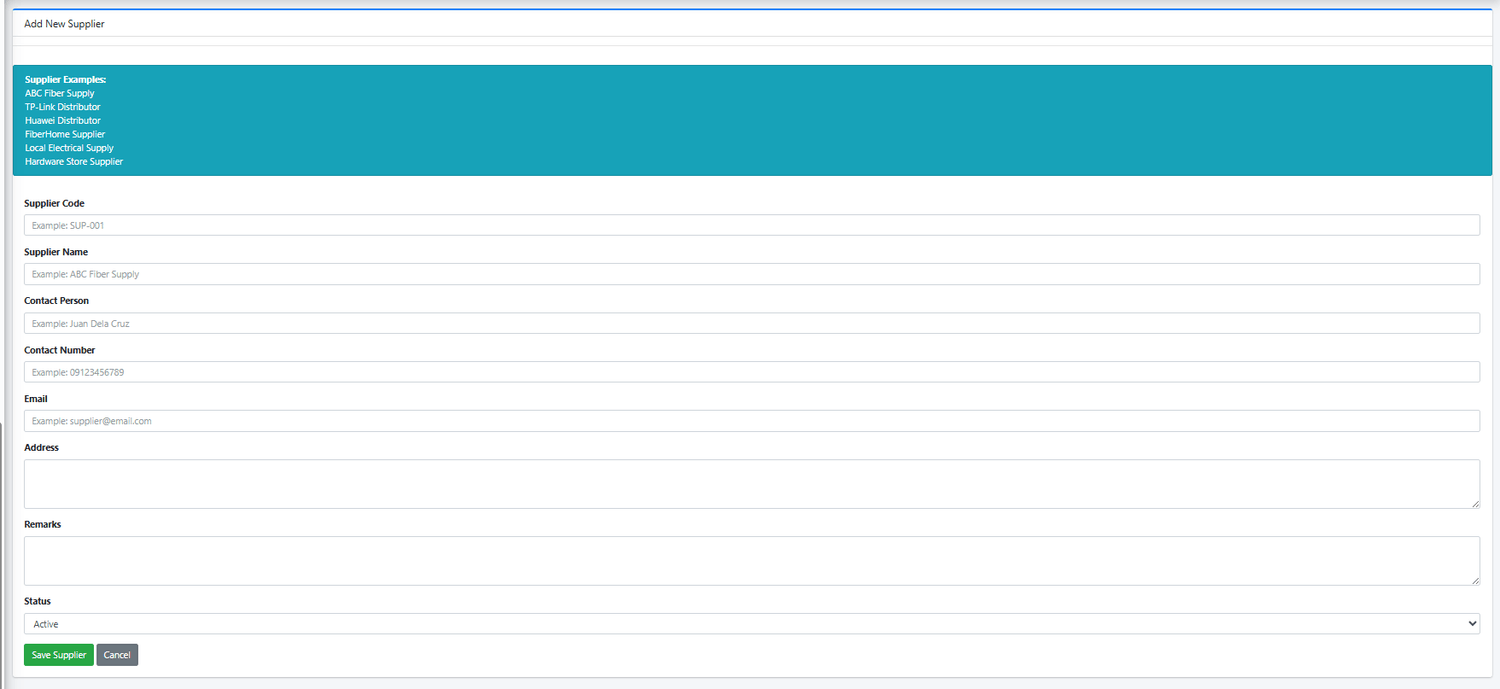
Each supplier record includes essential information such as supplier code, supplier name, contact person, contact number, email address, physical address, remarks, and supplier status. This allows administrators and purchasing personnel to quickly access supplier information whenever inventory needs to be replenished or procurement activities are required.
The page also provides example supplier types commonly used by Internet Service Providers, making it easier for businesses to build a complete supplier database during system setup.
Supplier Examples
The system can be used to manage suppliers such as:
Fiber Optic Material Suppliers
ONU and Router Distributors
TP-Link Distributors
Huawei Distributors
FiberHome Suppliers
Electrical Material Suppliers
Hardware Store Suppliers
Installation Material Vendors
Network Equipment Distributors
Office Supply Providers
Supplier Information Management
Each supplier profile may contain:
Supplier Code
A unique identifier used for internal supplier tracking and procurement management.
Supplier Name
The official business name of the supplier or distributor.
Contact Person
The primary representative responsible for inventory orders, quotations, and supplier communication.
Contact Number
Supplier telephone or mobile number for purchasing coordination and order follow-up.
Email Address
Used for purchase orders, quotations, supplier correspondence, and inventory procurement communication.
Physical Address
The supplier's business location for delivery coordination and supplier verification.
Remarks
Additional notes regarding pricing agreements, payment terms, delivery schedules, warranties, or supplier performance.
Status
Allows suppliers to be marked as active or inactive while preserving historical purchasing records.
Key Benefits
Centralized supplier database.
Organized vendor and distributor management.
Faster purchasing and procurement processes.
Improved supplier communication.
Better supplier record keeping.
Supports purchase order generation.
Simplifies inventory replenishment.
Maintains historical supplier relationships.
Reduces procurement errors and delays.
Enhances inventory planning and supplier coordination.
Integration with Inventory Purchasing
The Inventory Suppliers module works closely with the Purchase Orders and Receiving modules.
When creating purchase orders, users can quickly select suppliers from the database without repeatedly entering supplier information. This reduces data entry errors and ensures purchasing consistency across the organization.
Supplier records also provide valuable historical information for:
Purchase order generation
Inventory receiving
Cost comparisons
Supplier performance evaluation
Procurement reporting
Inventory replenishment planning
Ideal for ISP Operations
Internet Service Providers often purchase inventory from multiple suppliers, including vendors of:
Fiber optic cables
ONUs and modems
Routers and switches
Networking equipment
Installation materials
Electrical supplies
Technician tools
Safety equipment
Office supplies
Managing supplier information within the inventory system allows businesses to streamline procurement activities and maintain strong relationships with critical vendors.
Business Impact
As inventory operations grow, managing supplier information becomes increasingly important. Without a centralized supplier database, purchasing teams often waste time searching for contact details, tracking previous suppliers, or verifying vendor information.
The Inventory Suppliers feature creates a structured supplier management system that improves procurement efficiency, strengthens supplier relationships, supports purchasing operations, and helps businesses maintain reliable inventory replenishment processes.
For growing ISP businesses, this feature serves as the foundation of effective inventory procurement management by ensuring that supplier information remains accurate, organized, and readily available whenever inventory purchasing is required.

Purchase Orders
The Purchase Orders module is the procurement management center of the inventory system. It enables businesses to create, manage, monitor, and track inventory purchase requests before inventory is received into stock. This feature helps organizations maintain adequate inventory levels by automating the replenishment process and providing complete visibility into purchasing activities.
A Purchase Order (PO) serves as an official procurement document that records inventory items requested from suppliers, expected delivery dates, quantities to be purchased, unit costs, and total purchasing amounts. By formalizing the purchasing process, businesses can improve inventory planning, supplier coordination, budgeting, and procurement accountability.
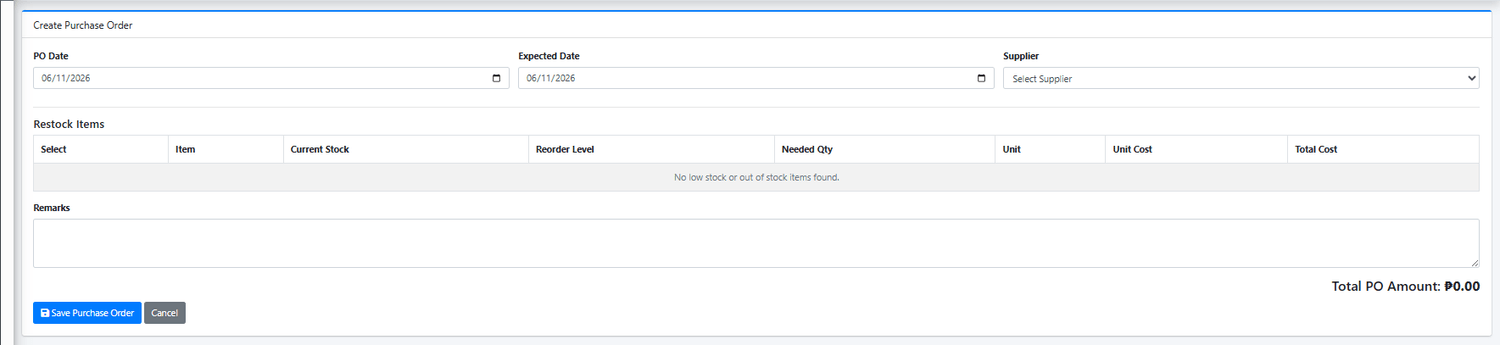
The system automatically identifies inventory items that have reached low stock or out-of-stock levels based on their configured reorder points. These items can then be included in purchase orders to ensure inventory is replenished before shortages affect operations.
Automated Restocking Intelligence
One of the most powerful features of the Purchase Orders module is its integration with the Inventory Stock Monitor.
The system automatically analyzes:
Current stock levels
Reorder levels
Low-stock items
Out-of-stock items
Required replenishment quantities
Based on this analysis, administrators can quickly generate purchase orders containing only the items that require replenishment, significantly reducing manual purchasing work and minimizing the risk of inventory shortages.
Purchase Order Information
Each Purchase Order contains detailed procurement information including:
Purchase Order Number
A unique reference number automatically generated for tracking and auditing purposes.
Supplier
The selected vendor or distributor responsible for fulfilling the order.
Purchase Order Date
The official date when the purchase request was created.
Expected Delivery Date
The anticipated date the inventory is expected to arrive.
Inventory Items
The specific products being purchased, including quantities and costs.
Unit Cost
The cost per individual inventory item.
Total Purchase Amount
The total value of the purchase order based on quantities and costs.
Remarks
Additional purchasing notes, delivery instructions, supplier references, or procurement details.
Status Tracking
Purchase Orders progress through various stages such as:
Pending
Partially Received
Received
Cancelled
This allows purchasing staff and management to monitor procurement progress and supplier fulfillment.
Integration with Inventory Receiving
The Purchase Orders module works seamlessly with the Inventory Receiving system.
Once inventory arrives from the supplier:
The Purchase Order is opened.
Inventory quantities are verified.
The purchase order is marked as received.
Inventory stock levels are automatically updated.
Stock transactions are automatically recorded.
Receiving reports are generated.
This integration eliminates duplicate data entry and ensures inventory records remain accurate.
Key Benefits
Automated inventory replenishment planning.
Low-stock and out-of-stock purchasing recommendations.
Centralized purchase order management.
Supplier-based procurement tracking.
Expected delivery monitoring.
Purchase cost visibility and budgeting.
Improved purchasing accountability.
Automatic inventory updates upon receiving.
Reduced stock shortages and operational interruptions.
Complete procurement audit trail.
Ideal for ISP Operations
Internet Service Providers rely heavily on inventory availability to support installations, repairs, maintenance, and network expansion projects. The Purchase Orders module helps manage procurement of:
Fiber optic cables
ONUs and modems
Routers and switches
Networking equipment
Installation materials
Technician tools
Electrical components
Spare parts
Safety equipment
Office supplies
By ensuring these materials are replenished on time, businesses can maintain uninterrupted operations and continue serving customers efficiently.
Business Impact
Without a structured purchasing process, businesses often experience inventory shortages, delayed installations, emergency purchases, inconsistent supplier management, and poor inventory forecasting.
The Purchase Orders feature introduces a systematic procurement workflow that improves purchasing efficiency, inventory availability, supplier coordination, and budget management. It provides management with complete visibility into purchasing activities while ensuring inventory replenishment is proactive rather than reactive.
For growing ISP businesses, this module becomes a critical component of inventory planning, helping maintain optimal stock levels, reduce procurement delays, and support scalable business operations.
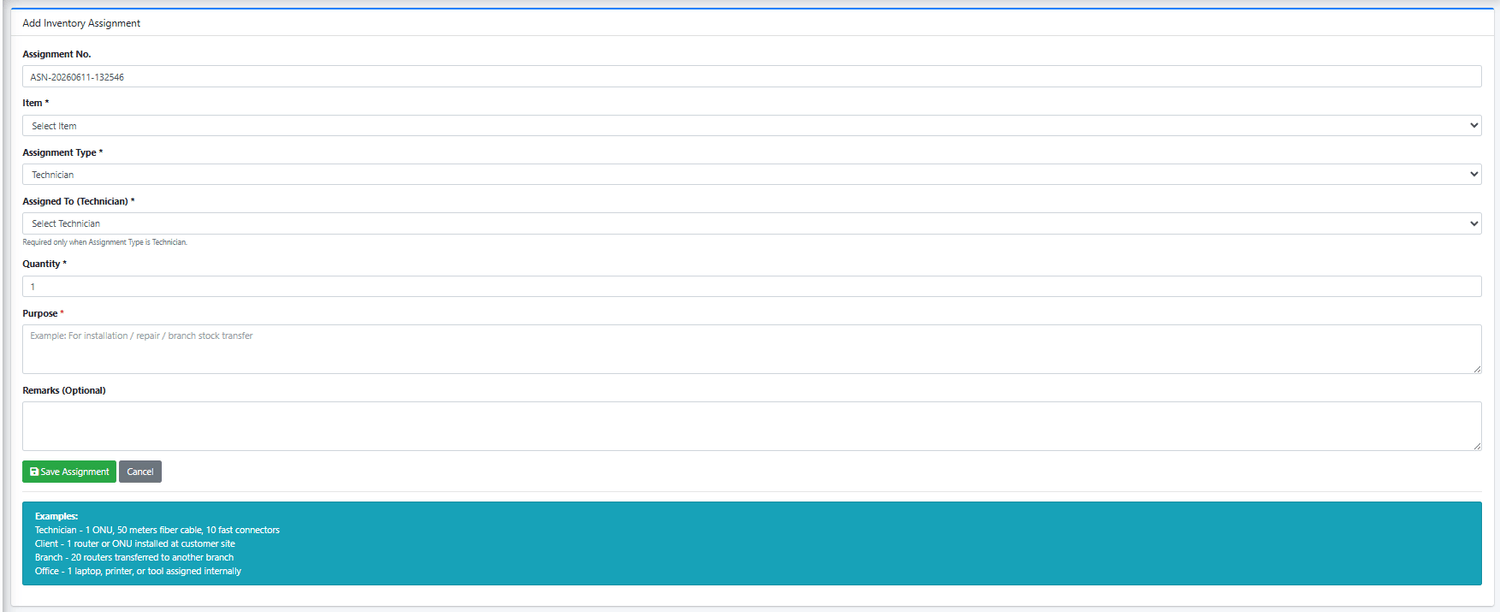
Inventory Assignments
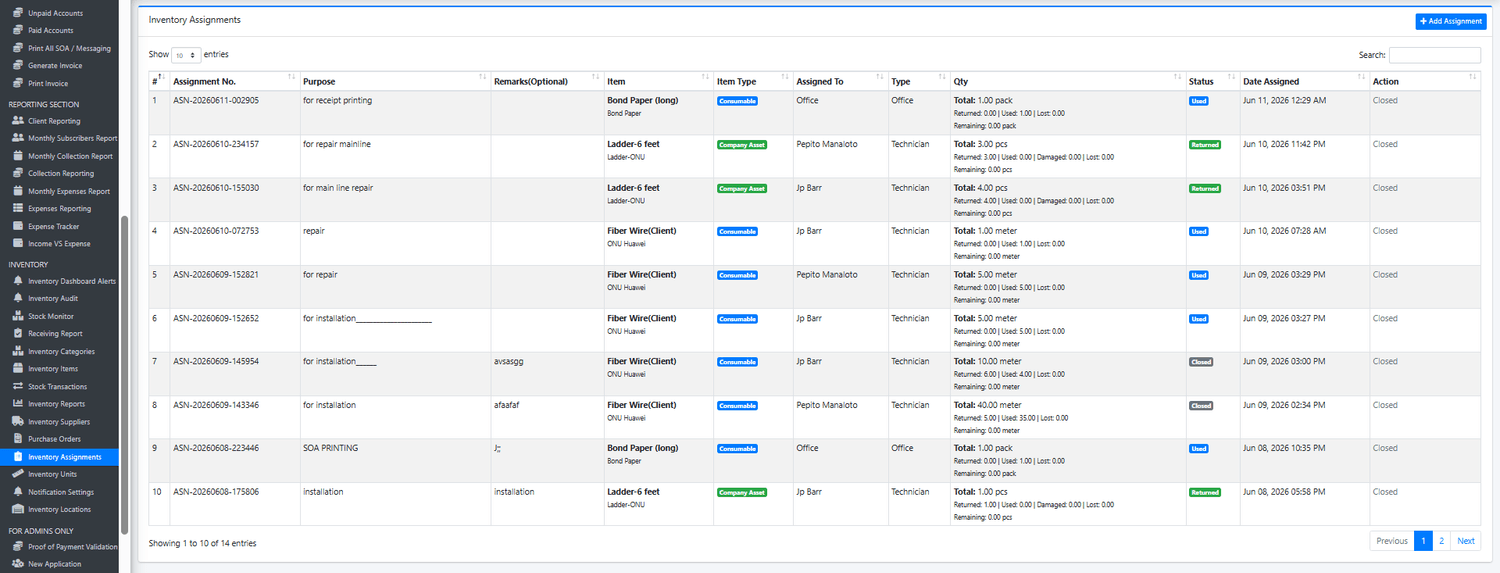
The Inventory Assignments module is one of the most powerful features of the Inventory Management System. It provides complete control and accountability over inventory items that are issued, assigned, transferred, or entrusted to technicians, employees, offices, branches, or operational projects.
This feature ensures that every inventory item leaving the warehouse or stockroom is properly documented, tracked, monitored, and accounted for throughout its lifecycle. Whether assigning consumable materials for installations or company assets for field operations, the system maintains a complete record of inventory responsibility and usage.
Each assignment is automatically assigned a unique Assignment Number and contains detailed information such as assigned item, quantity, assignment type, assigned person or department, purpose, remarks, assignment date, and inventory status.
The module works closely with inventory stock management, automatically reducing available stock when items are assigned and tracking what happens to those items afterward.
Assignment Types
The system supports multiple assignment scenarios commonly encountered in ISP operations.
Technician Assignment
Used when inventory items are assigned directly to technicians for field work.
Examples:
50 meters fiber cable for installation
ONU for customer deployment
Fast connectors for repairs
Technician tools and equipment
The assigned technician becomes responsible for the inventory until it is properly processed as used, returned, damaged, lost, repaired, or found.
Office Assignment
Used when inventory is issued internally for office operations.
Examples:
Bond paper
Printer ink
Office supplies
Office equipment
These assignments help monitor internal inventory consumption and administrative expenses.
Branch Assignment
Used when inventory is transferred between company locations.
Examples:
Routers transferred to branch office
Spare parts allocated to regional warehouse
Inventory distributed to satellite offices
This improves inventory visibility across multiple locations and operational sites.
Client Assignment
Used when inventory is deployed to customer locations.
Examples:
ONU installations
Routers provided to subscribers
Modems issued to customers
Client equipment deployment
This helps businesses maintain records of customer-issued equipment and installation materials.
Inventory Accountability Tracking
Unlike basic inventory systems that simply deduct stock, the Inventory Assignments module continues tracking assigned inventory after issuance.
The system records:
Total Assigned Quantity
Returned Quantity
Used Quantity
Damaged Quantity
Lost Quantity
Repaired Quantity
Found Quantity
Remaining Quantity
This provides complete visibility into the status of every assigned inventory item.
Consumable Item Management
Consumable items are materials that are expected to be used during operations.
Examples:
Fiber optic cable
Electrical tape
RJ45 connectors
Cable ties
Installation materials
When assigned, these items can later be processed as:
Used
Returned
Damaged
Lost
This allows management to understand actual material consumption and reduce inventory waste.
Company Asset Management
Company Assets are reusable items that remain company property.
Examples:
Ladders
Fusion Splicers
OTDR Equipment
Power Meters
Hand Tools
Safety Equipment
The system tracks these assets until they are returned or properly accounted for.
Asset statuses may include:
Assigned
Returned
Damaged
Lost
Repaired
Found
This significantly improves employee accountability and asset control.
Assignment Lifecycle Management
Every assignment follows a complete workflow:
Step 1 – Assignment Creation
Inventory is assigned to a technician, office, branch, or client.
Step 2 – Stock Deduction
The assigned quantity is automatically deducted from available inventory.
Step 3 – Field Usage
The assigned inventory is used for installations, repairs, maintenance, or operational activities.
Step 4 – Assignment Processing
The assigned inventory is processed as:
Used
Returned
Damaged
Lost
Repaired
Found
Step 5 – Assignment Closure
Once all quantities have been accounted for, the assignment is automatically marked as completed or closed.
Assignment Status Monitoring
The system provides real-time assignment monitoring through status indicators such as:
Assigned
Partially Returned
Returned
Used
Damaged
Lost
Closed
This allows administrators to quickly identify outstanding inventory responsibilities.
Key Benefits
Complete inventory accountability.
Technician inventory tracking.
Office inventory monitoring.
Branch inventory transfers.
Customer equipment assignment records.
Automatic stock deduction.
Return and usage monitoring.
Lost and damaged inventory tracking.
Company asset management.
Reduced inventory shrinkage.
Improved technician accountability.
Complete assignment audit trail.
Enhanced inventory visibility.
Ideal for ISP Operations
Internet Service Providers frequently assign inventory to technicians and operational teams for installations, repairs, maintenance, and customer deployments.
Common assigned inventory includes:
Fiber optic cables
ONUs
Routers
Modems
Fast connectors
Patch cords
Electrical materials
Technician tools
Testing equipment
Safety equipment
The Inventory Assignments module ensures that every item issued from stock remains traceable and accountable throughout its operational use.
Business Impact
One of the biggest causes of inventory loss in growing ISP businesses is the lack of accountability after inventory leaves the warehouse.
Without assignment tracking:
Materials disappear without records.
Tools are misplaced.
Inventory losses go unnoticed.
Technicians cannot be held accountable.
Inventory reports become inaccurate.
The Inventory Assignments feature solves these challenges by creating a complete chain of custody for every assigned inventory item.
By tracking who received inventory, why it was assigned, how it was used, and what happened to it afterward, businesses gain stronger inventory control, improved operational efficiency, reduced losses, better asset management, and greater confidence in inventory accuracy.
For ISP businesses managing technicians, customer equipment, installation materials, and operational assets, this module becomes one of the most valuable tools for protecting inventory investments and maintaining full inventory accountability.
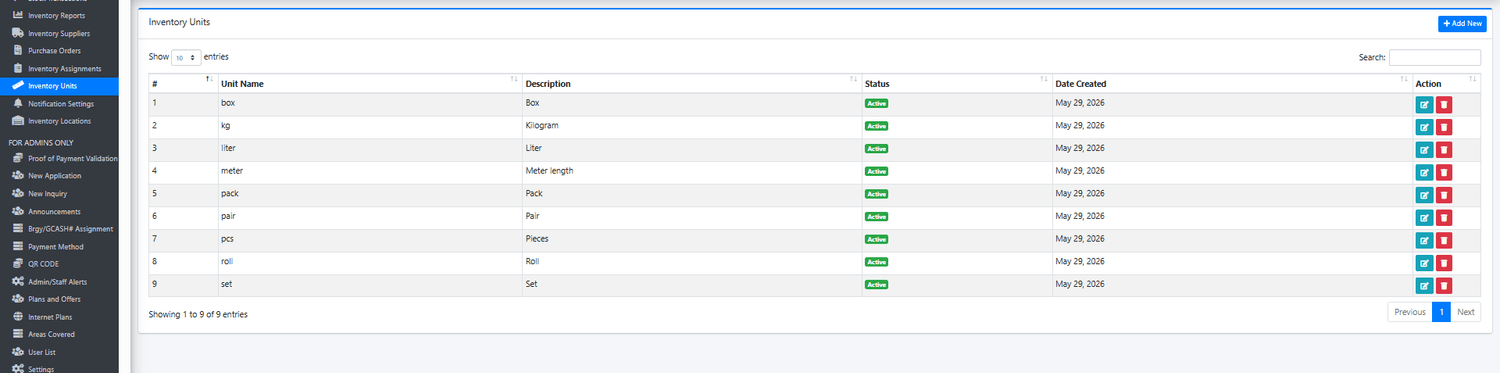
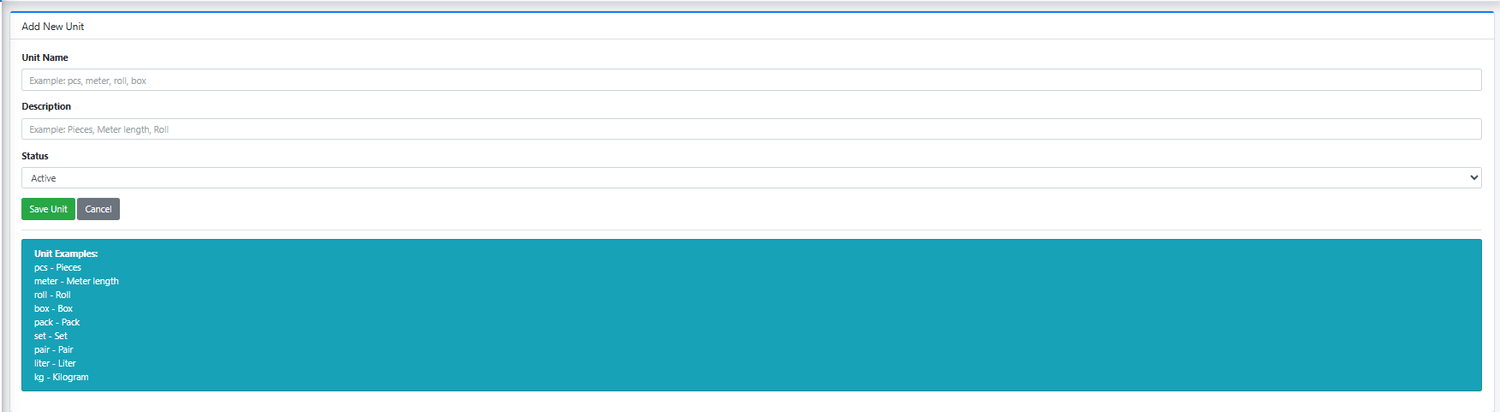
Inventory Units
The Inventory Units module serves as the measurement management system of the inventory platform. It allows businesses to define and standardize the units of measurement used throughout the inventory management process. By maintaining a centralized list of units, organizations can ensure consistency in inventory tracking, stock monitoring, purchasing, receiving, assignments, audits, and reporting.
Every inventory item within the system is assigned a specific unit of measure, allowing quantities to be recorded accurately and uniformly across all inventory transactions. This prevents confusion, improves inventory accuracy, and ensures that stock quantities are measured and reported consistently throughout the organization.
The Inventory Units module provides a simple yet essential framework for defining measurement standards used by different inventory categories and operational requirements.
Common Unit Examples
The system supports various units commonly used in ISP and business inventory operations.
Pieces (pcs)
Used for individual inventory items.
Examples:
ONUs
Routers
Modems
Switches
Power adapters
Tools
Meter (meter)
Used for length-based inventory items.
Examples:
Fiber optic cables
UTP cables
Drop wires
Conduits
Roll (roll)
Used for inventory supplied in rolls.
Examples:
Fiber cable rolls
Electrical tape
Cable rolls
Pack (pack)
Used for grouped inventory items.
Examples:
Cable ties
RJ45 connectors
Fast connectors
Office supplies
Set (set)
Used for inventory sold or issued as complete sets.
Examples:
Tool kits
Safety equipment sets
Network installation kits
Pair (pair)
Used for items issued in matching pairs.
Examples:
Safety gloves
Safety boots
Specialized equipment accessories
Liter (liter)
Used for liquid inventory items.
Examples:
Fuel
Cleaning solutions
Lubricants
Kilogram (kg)
Used for weight-based inventory items.
Examples:
Bulk materials
Construction supplies
Specialized inventory components
Box (box)
Used for inventory packaged in cartons or boxes.
Examples:
RJ45 connector boxes
ONU boxes
Office supplies
Why Units Matter
Accurate inventory management depends heavily on proper measurement standards.
For example:
Fiber cable is typically tracked by meter
ONUs are tracked by pieces
Connectors may be tracked by pack
Safety equipment may be tracked by set
Without proper unit management, inventory quantities can become inconsistent, causing errors in stock monitoring, purchasing, assignments, receiving, and inventory reporting.
The Inventory Units module ensures that every inventory item is measured correctly and consistently throughout its lifecycle.
Integration Across the Inventory System
The Inventory Units feature is integrated into all major inventory functions including:
Inventory Items
Defines the primary unit assigned to inventory products.
Stock Transactions
Records inventory movement quantities using the assigned unit.
Purchase Orders
Calculates purchasing quantities based on the correct measurement unit.
Receiving Reports
Verifies supplier deliveries according to the defined unit of measure.
Inventory Assignments
Tracks issued inventory using standardized measurements.
Inventory Audits
Compares physical counts using consistent quantity units.
Inventory Reports
Generates accurate inventory summaries and stock movement reports.
Key Benefits
Standardized inventory measurements.
Improved inventory accuracy.
Consistent stock tracking.
Better purchasing calculations.
Simplified inventory reporting.
Reduced inventory quantity errors.
Improved audit reliability.
Better operational visibility.
Flexible support for different inventory types.
Scalable measurement management.
Ideal for ISP Operations
Internet Service Providers manage inventory using various measurement units depending on the type of inventory being tracked.
Examples include:
Inventory ItemUnitFiber Optic CableMeterONUPiecesRouterPiecesFast ConnectorPackCable TiePackSafety GlovesPairTool KitSetElectrical TapeRoll
The Inventory Units module ensures these materials are measured consistently across all inventory operations.
Business Impact
Although often overlooked, unit management is one of the most important components of an inventory system. Incorrect measurement standards can lead to inaccurate stock balances, purchasing mistakes, reporting inconsistencies, and inventory discrepancies.
The Inventory Units feature establishes a reliable measurement framework that improves inventory accuracy, strengthens inventory controls, supports operational efficiency, and ensures that every inventory transaction is measured correctly.
For growing ISP businesses, this module provides the foundation for accurate stock management, reliable inventory reporting, and scalable inventory operations across all departments and locations.

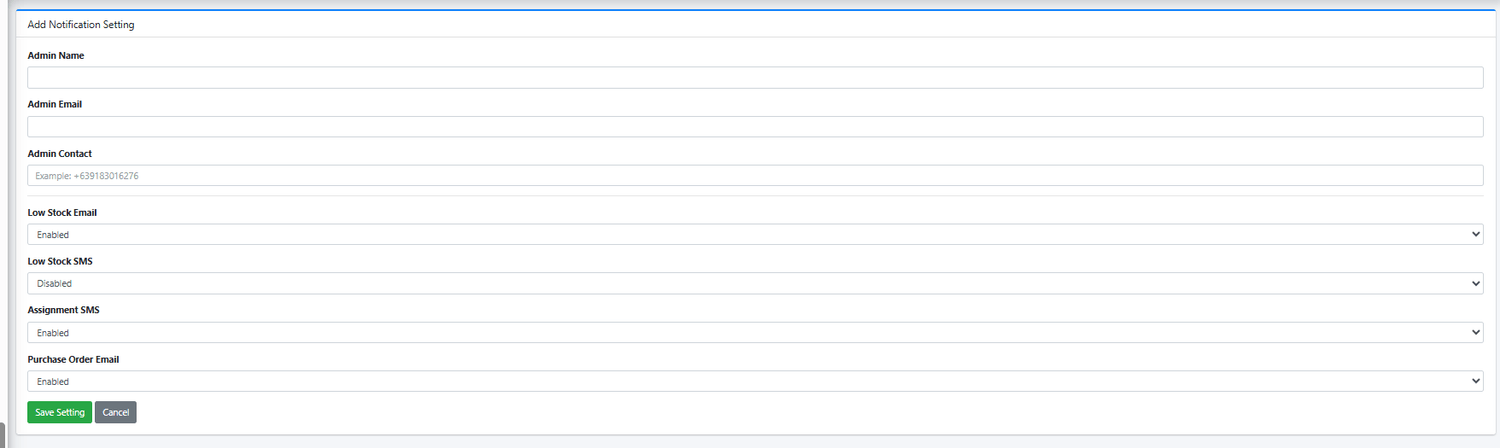
Notification Settings
The Inventory Notification Settings module allows businesses to automate inventory-related alerts and notifications through email and SMS. This feature ensures that administrators, inventory managers, warehouse personnel, and business owners are immediately informed whenever important inventory events occur, allowing them to respond quickly and prevent operational disruptions.
Instead of manually monitoring inventory levels, purchase orders, assignments, and stock movements, the system automatically sends notifications based on predefined inventory events. This improves inventory visibility, strengthens operational control, and helps management stay informed even when away from the office.
The notification settings can be customized for each administrator, allowing businesses to determine who receives specific inventory alerts and through which communication channels.
Administrator Notification Profile
Each notification profile contains:
Administrator Name
The designated recipient of inventory alerts and notifications.
Email Address
Used for sending detailed inventory notifications and reports.
Contact Number
Used for SMS-based alerts that require immediate attention.
Available Notification Types
The system supports multiple inventory-related notifications to keep management informed of critical inventory events.
Low Stock Email Notifications
Automatically sends email alerts whenever inventory quantities fall below the configured reorder level.
Examples:
Fiber cable stock reaching minimum threshold
ONU inventory nearing depletion
Fast connector inventory running low
Office supplies requiring replenishment
Benefits:
Prevent inventory shortages
Improve purchasing planning
Reduce operational delays
Support proactive inventory management
Low Stock SMS Notifications
Automatically sends SMS alerts when inventory reaches critical stock levels.
Examples:
Emergency low stock warnings
Critical inventory shortages
Immediate replenishment requirements
Benefits:
Instant notification delivery
Faster response time
Increased inventory awareness
Reduced risk of stockouts
Assignment SMS Notifications
Automatically sends notifications when inventory is assigned to technicians, employees, offices, branches, or operational projects.
Examples:
ONU assigned to technician
Fiber cable issued for installation
Tool assigned to field personnel
Equipment transferred to branch office
Benefits:
Improves inventory accountability
Provides assignment confirmation
Enhances inventory tracking
Reduces assignment disputes
Purchase Order Email Notifications
Automatically sends notifications when purchase orders are created or processed.
Examples:
New purchase order generated
Inventory replenishment request created
Procurement approval notifications
Supplier purchasing activities
Benefits:
Improves procurement visibility
Supports purchasing workflows
Enhances supplier coordination
Keeps management informed of purchasing activities
Future Notification Expansion
The Inventory Notification System is designed to support additional inventory alerts as business requirements grow.
Potential notifications include:
Out of Stock Alerts
Damaged Inventory Alerts
Lost Inventory Alerts
Partial Return Alerts
Inventory Audit Alerts
Inventory Adjustment Notifications
Supplier Delivery Notifications
Purchase Order Received Alerts
Asset Return Reminders
Overdue Assignment Notifications
Daily Inventory Summary Reports
Key Benefits
Automated inventory monitoring.
Real-time inventory alerts.
Email and SMS notification support.
Faster response to inventory issues.
Reduced risk of stock shortages.
Improved inventory accountability.
Better purchasing visibility.
Enhanced management oversight.
Reduced manual monitoring requirements.
Improved operational efficiency.
Ideal for ISP Operations
Internet Service Providers often manage critical inventory that directly affects customer installations and network operations.
Examples include:
Fiber optic cables
ONUs and modems
Routers and switches
Installation materials
Technician tools
Spare parts
Network equipment
By receiving automated alerts, ISP operators can respond immediately to inventory shortages, assignment activities, procurement requirements, and other important inventory events before they impact customer service.
Business Impact
Without automated notifications, businesses must constantly monitor inventory records manually, increasing the risk of missed shortages, delayed purchases, untracked assignments, and operational interruptions.
The Inventory Notification Settings feature transforms inventory management into a proactive process by automatically informing the right people at the right time. This helps businesses maintain optimal stock levels, improve inventory accountability, accelerate purchasing decisions, and strengthen operational control.
For growing ISP businesses, this module acts as an intelligent inventory alert system, ensuring that critical inventory information reaches management instantly, allowing faster decision-making and more efficient inventory operations.