
YourBusinessScripts
For ISP | PISO WIFI | VOUCHER HOTSPOT PROVIDERS
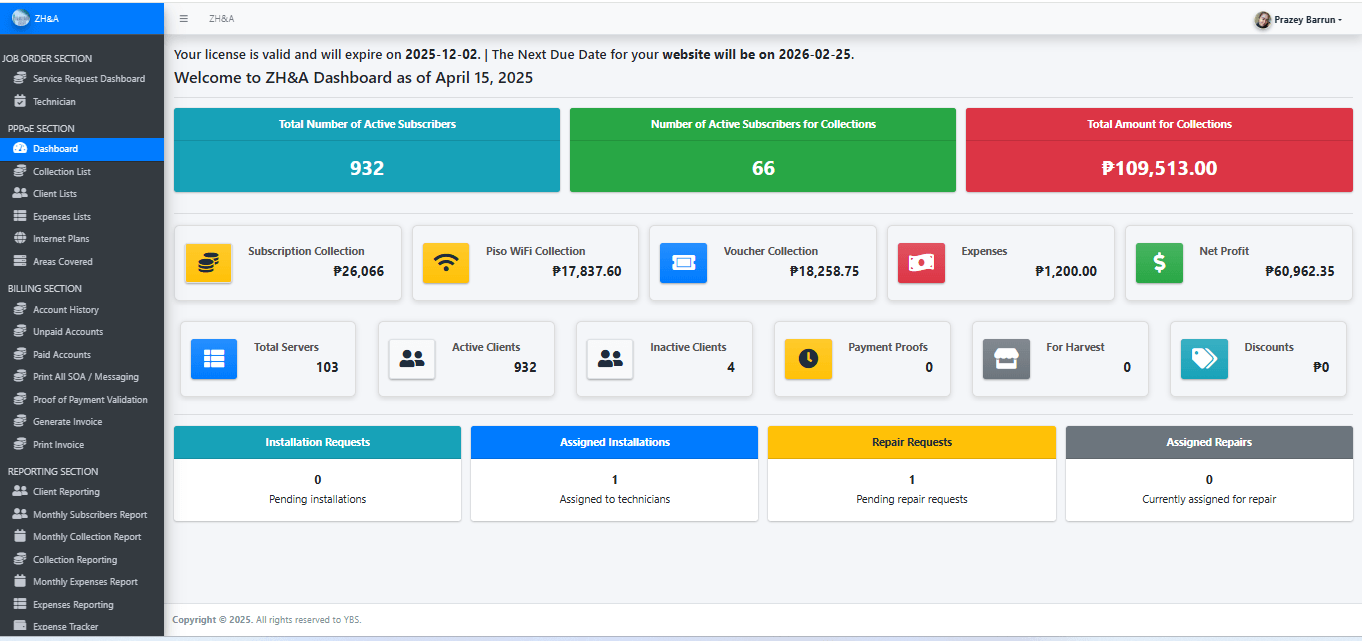
📷📷𝐈𝐒𝐏 𝐁𝐈𝐋𝐋𝐈𝐍𝐆 𝐒𝐘𝐒𝐓𝐄𝐌📷 (𝐎𝐍𝐋𝐈𝐍𝐄 𝐀𝐂𝐂𝐄𝐒𝐒)
📷𝐏𝐏𝐏𝐨𝐄 𝐔𝐧𝐩𝐚𝐢𝐝 / 𝐏𝐚𝐢𝐝 𝐀𝐜𝐜𝐨𝐮𝐧𝐭𝐬 𝐓𝐫𝐚𝐜𝐤𝐞𝐫
📷𝐏𝐢𝐬𝐨 𝐖𝐢𝐟𝐢 % 𝐒𝐡𝐚𝐫𝐢𝐧𝐠 𝐑𝐞𝐜𝐨𝐫𝐝𝐢𝐧𝐠
📷𝐇𝐨𝐭𝐬𝐩𝐨𝐭/𝐕𝐨𝐮𝐜𝐡𝐞𝐫 𝐓𝐢𝐜𝐤𝐞𝐭 𝐒𝐚𝐥𝐞𝐬 𝐑𝐞𝐜𝐨𝐫𝐝𝐢𝐧𝐠
📷 𝐌𝐚𝐝𝐚𝐦𝐢 𝐤𝐚𝐧𝐠 𝐡𝐚𝐰𝐚𝐤 𝐧𝐚 𝐛𝐫𝐠𝐲?
📷𝐁𝐚𝐰𝐚𝐬𝐚𝐧 𝐧𝐚𝐭𝐢𝐧 𝐚𝐧𝐠 𝐬𝐭𝐫𝐞𝐬𝐬 𝐦𝐨 𝐬𝐚 𝐩𝐚𝐠 𝐭𝐚𝐭𝐫𝐚𝐜𝐤 𝐬𝐚 𝐦𝐠𝐚 𝐜𝐥𝐢𝐞𝐧𝐭𝐬 𝐦𝐨𝐧𝐠 𝐦𝐚𝐲 𝐦𝐠𝐚 𝐮𝐧𝐩𝐚𝐢𝐝 𝐛𝐚𝐥𝐚𝐧𝐜𝐞𝐬 𝐩𝐚..
📷𝐏𝐥𝐮𝐬 𝐡𝐢𝐧𝐝𝐢 𝐦𝐨 𝐧𝐚 𝐦𝐚𝐦𝐢 𝐦𝐢𝐬𝐬 𝐚𝐧𝐠 𝐦𝐠𝐚 𝐜𝐥𝐢𝐞𝐧𝐭𝐬 𝐦𝐨𝐧𝐠 𝐟𝐨𝐫 𝐡𝐚𝐫𝐯𝐞𝐬𝐭!
📷𝑼𝒑𝒅𝒂𝒕𝒆𝒅 𝑭𝒆𝒂𝒕𝒖𝒓𝒆𝒔 𝒏𝒈 𝑺𝒚𝒔𝒕𝒆𝒎 𝒌𝒐: 📷
📷𝐔𝐧𝐩𝐚𝐢𝐝/𝐏𝐚𝐢𝐝 𝐚𝐜𝐜𝐨𝐮𝐧𝐭𝐬 𝐭𝐫𝐚𝐜𝐤𝐞𝐫(best feature)
📷 𝐑𝐞𝐜𝐞𝐢𝐩𝐭 𝐏𝐫𝐢𝐧𝐭𝐢𝐧𝐠 / 𝐒𝐎𝐀 𝐏𝐫𝐢𝐧𝐭𝐢𝐧𝐠 on the go bastat bitbit mo lang portable printer mo 📷
📷 Para ka ng naka 𝐦𝐨𝐛𝐢𝐥𝐞 𝐚𝐩𝐩 dahil sa pwede mo ng iadd ang website nyo sa iyong home screen!
📷𝐉𝐨𝐛 𝐎𝐫𝐝𝐞𝐫 𝐅𝐨𝐫𝐦(Printable) with Scannable QR code to direct to your own website.
📷Create and Assign 𝐫𝐞𝐩𝐚𝐢𝐫 𝐨𝐫 𝐢𝐧𝐬𝐭𝐚𝐥𝐥𝐚𝐭𝐢𝐨𝐧 𝐫𝐞𝐪𝐮𝐞𝐬𝐭 sa mga technician nyo...
📷𝐏𝐢𝐬𝐨 𝐖𝐢𝐟𝐢 𝐏𝐞𝐫𝐜𝐞𝐧𝐭𝐚𝐠𝐞 𝐒𝐡𝐚𝐫𝐢𝐧𝐠
📷𝐏𝐢𝐬𝐨 𝐖𝐢𝐟𝐢 𝐇𝐚𝐫𝐯𝐞𝐬𝐭 𝐑𝐞𝐦𝐢𝐧𝐝𝐞𝐫
📷𝐁𝐢𝐥𝐥 𝐝𝐢𝐬𝐜𝐨𝐮𝐧𝐭
📷𝐃𝐢𝐫𝐞𝐜𝐭 𝐦𝐞𝐬𝐬𝐚𝐠𝐢𝐧𝐠 kina client by putting your client's messenger ID
📷𝐑𝐞𝐩𝐨𝐫𝐭 𝐠𝐞𝐧𝐞𝐫𝐚𝐭𝐢𝐨𝐧 represented by graphs
📷𝐈𝐧𝐜𝐨𝐦𝐞 𝐕𝐒 𝐄𝐱𝐩𝐞𝐧𝐬𝐞 report
📷Automatic 𝐚𝐜𝐜𝐨𝐮𝐧𝐭 𝐧𝐮𝐦𝐛𝐞𝐫 generation
📷𝐏𝐫𝐢𝐧𝐭 𝐀𝐥𝐥 𝐒𝐭𝐚𝐭𝐞𝐦𝐞𝐧𝐭 𝐨𝐟 𝐀𝐜𝐜𝐨𝐮𝐧𝐭
📷𝐄𝐱𝐩𝐞𝐧𝐬𝐞 𝐥𝐢𝐬𝐭𝐬 𝐚𝐧𝐝 𝐭𝐫𝐚𝐜𝐤𝐞𝐫
📷𝐂𝐫𝐞𝐚𝐭𝐞𝐬 𝐮𝐧𝐥𝐢𝐦𝐢𝐭𝐞𝐝 𝐮𝐬𝐞𝐫 𝐥𝐢𝐬𝐭𝐬: Admin, staff, client, technician, collector and investor
📷 Input 𝐮𝐧𝐥𝐢𝐦𝐢𝐭𝐞𝐝 𝐧𝐮𝐦𝐛𝐞𝐫 of subscribers
📷𝐄𝐱𝐩𝐨𝐫𝐭 𝐚𝐧𝐲𝐭𝐢𝐦𝐞 𝐚𝐧𝐠 𝐥𝐚𝐦𝐚𝐧 𝐧𝐠 𝐝𝐚𝐭𝐚𝐛𝐚𝐬𝐞 𝐦𝐨(client lists and collection lists)
📷 𝐒𝐮𝐛𝐬𝐜𝐫𝐢𝐛𝐞𝐫 𝐩𝐫𝐨𝐨𝐟 𝐨𝐟 𝐩𝐚𝐲𝐦𝐞𝐧𝐭 𝐮𝐩𝐥𝐨𝐚𝐝
📷 𝐏𝐥𝐮𝐬 𝐩𝐰𝐞𝐝𝐞 𝐦𝐨 𝐧𝐚𝐧𝐠 𝐦𝐚𝐢𝐬𝐚𝐦𝐚 𝐬𝐚 𝐬𝐲𝐬𝐭𝐞𝐦 𝐦𝐨 𝐚𝐧𝐠 𝐦𝐠𝐚 𝐭𝐢𝐜𝐤𝐞𝐭 𝐬𝐚𝐥𝐞𝐬 𝐦𝐨 𝐟𝐫𝐨𝐦 𝐲𝐨𝐮𝐫 𝐇𝐨𝐭𝐬𝐩𝐨𝐭/𝐕𝐨𝐮𝐜𝐡𝐞𝐫 (new feature)
HOW TO ADD A CLIENT?
Before adding a client, make sure to lists first all your plan names, plan price and areas/barangays covered by your internet service.
(a) Add your plan names and plan price followed by adding all your covered areas/barangays.
(b) Adding your clients in the system:
Before clicking the ADD NEW button, copy first the account number then click the add new button and paste the account number in the account number field.
HOW TO RECORD A PAYMENT IN THE COLLECTION LIST?
Before recording a payment, click first the statement of the account and search on the client's name that we will do a payment recording. Make sure to check only one box in the category.
ADDING YOUR EXPENSES
Here are the two types of users that has the ability to add their expenses: staff and admin.
ADDING YOUR CLIENTS IN THE USER LISTS
Copy your client's name in the Statement of Account section. Click User Lists and Create New. Paste the given name in the first and last name fields and please make sure that there are no additional space after each name.
Client has three access in the system:
1. Viewing their own SOA.
2. Reporting a problem regarding the internet service.
3. Clients can now upload their payment proof in your system.
HOW TO ADD ANOTHER USERS IN YOUR SYSTEM.
TAKE NOTE THAT ADMIN ACCESS CAN ONLY ADD ANOTHER USERS IN THE SYSTEM.
HOW TO CREATE JOB ORDER(REPAIR / INSTALLATIONS)
Add first your technician under the Technician section and copy your technician's name in the User List section. Click User Lists and Create New. Paste the given name in the first and last name fields and please make sure that there are no additional space after each name.
STEP 1: ADD FIRST YOUR TECHNICIAN/s
STEP 2: CREATING A JOB ORDER(REPAIR / INSTALLATION REQUEST)
STEP 3: CLOSING A JOB ORDER REQUEST
HOW TO TRACK SALES FROM YOUR PISO WIFI RESELLERS
STEP 1: ADD FIRST YOUR PISO WIFI AREAS/BRGY AS SHOWN IN THE VIDEO
STEP 2: TRACKING YOUR PISO WIFI HARVEST SALES
ARE YOU HARVESTING TWICE OR THRICE PER MONTH?
HOW TO TRACK SALES FROM YOUR HOTSPOT VOUCHER RESELLERS
STEP 1: Add first you Voucher Reseller Areas
STEP 2: Add NEW Voucher Resellers then select corresponding area and percentage share.
STEP 3: After Step1 and Step2, follow now the video below.
THANK YOU EZTECH OF TAYTAY, RIZAL BRANCH


Lorem ipsum dolor sit amet, consectetur adipisicing elit. Autem dolore, alias, numquam enim ab voluptate id quam harum ducimus cupiditate similique quisquam et deserunt, recusandae.


